Skip to content
14 days completely freeNo credit card required · No commitment to continue→ Start 14-day free trial

Solutions

Different roles. One set of records.

A captain, a purser, a head of department and a crew member need very different views of the same vessel. Yacht Watchkeeper gives each of them the part they are responsible for.

Captains

The vessel's compliance position, without chasing it.

Rest hour breaches, lapsing certification and rotation changes usually surface late, in someone else's spreadsheet.

  • MLC 2006 rest position across the whole crew, including rolling checks
  • Certification gaps by position and department before they bite
  • Month sign-off with a signed, immutable record
  • Watch schedules published from the vessel's real operating modes
  • End of contract initiated, reviewed and approved in one flow
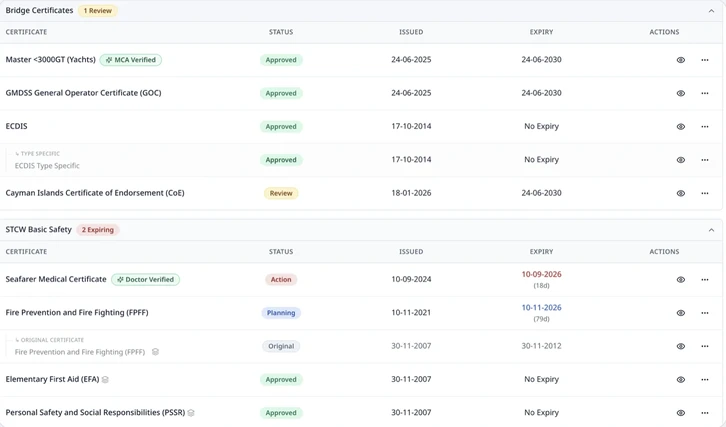
Yacht Watchkeeper certificate compliance view showing STCW certificates with approved, missing and expiring status against a position's requirements.
Scheduling & MLC

Pursers & Administration

Stop entering the same information four times.

Crew data lives across contracts, spreadsheets, folders and inboxes, and every rotation change means re-keying all of it.

  • SEAs, passports and certificates read into structured records
  • Rotation changes flowing into leave balances and travel planning
  • Payroll preparation drawn from contracts, rotations and approved expenses
  • Travel email, travel letter, crew list, itinerary and COR sent in three clicks
  • IMO FAL forms and clearance packs pre-filled from live data
Yacht Watchkeeper payroll preparation screen showing salaries, allowances and deductions for the period.
Rotation, Leave & Payroll

Heads of Department

Plan your department around who is actually available.

Department planning depends on leave, travel days, watch commitments and certification that sit in four different places.

  • Departmental availability across rotation, leave and travel
  • Watch assignments and swap approvals within the department
  • Certification status for the people you are rostering
  • Day workers and contractors tracked alongside permanent crew
  • A menu you can customise to the way your department works
Yacht Watchkeeper crew management screen showing departmental crew records and employment status.
Vessel Operations

Crew

Your schedule, your leave, your documents.

Crew are usually the last to see the rotation, and the first to be asked for a certificate they sent months ago.

  • Personal watch schedule and rest records on any device
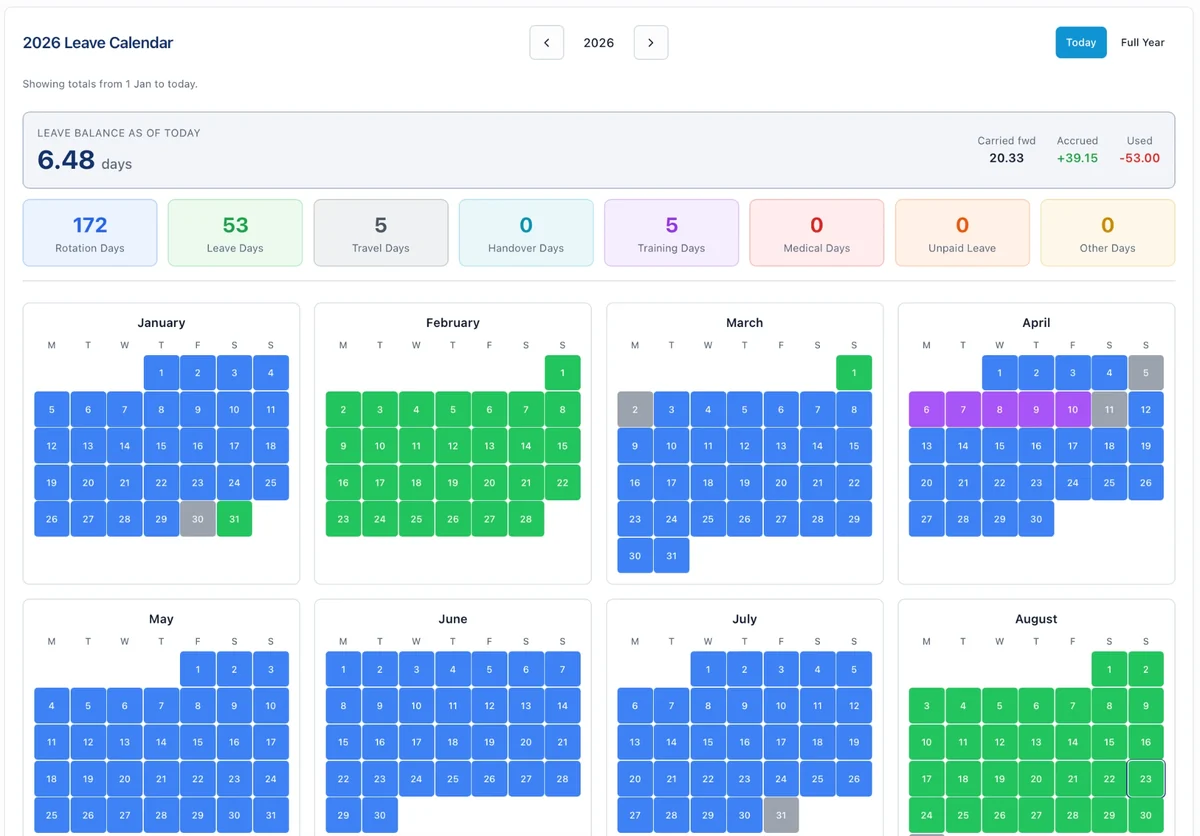
  • Leave balance and upcoming rotation, kept current
  • Certificates and documents uploaded once and held securely
  • Sign in and out at the gangway from a phone
  • Expenses submitted with a photograph of the receipt
Yacht Watchkeeper personal leave calendar showing a crew member's rotation, leave, travel and training days across the year with a running leave balance.
Crew & Employment

Management Companies & Owners' Representatives

Oversight across the fleet, without sitting in every inbox.

Shoreside teams need a reliable compliance picture across several vessels, but usually rely on whatever is reported to them.

  • Fleet-level compliance and risk overview
  • Access levels for admin and finance, full or view-only
  • Consistent records across vessels rather than per-yacht spreadsheets
  • Auditable sign-off history and change logs
  • Access decoupled from job titles, so oversight stays deliberate
Security & data handling

Set up your vessel the way your roles actually work.

Talk to Us