Skip to content
14 days completely freeNo credit card required · No commitment to continue→ Start 14-day free trial

The Platform

The information is connected. The systems often aren’t.

One entry. Everywhere it belongs. Give Yacht Watchkeeper the information once, and let AI and automation take care of the admin that follows — across seven connected areas covering crew, compliance, vessel certification and yacht operations.

Yacht Watchkeeper is not a planned maintenance system, an engineering maintenance system, a general ledger or a complete ISM/SMS platform, and does not attempt to replace them.

01

Crew & Employment

One record per crew member, from the first offer letter through to the final day aboard — with the employment terms that everything else depends on.
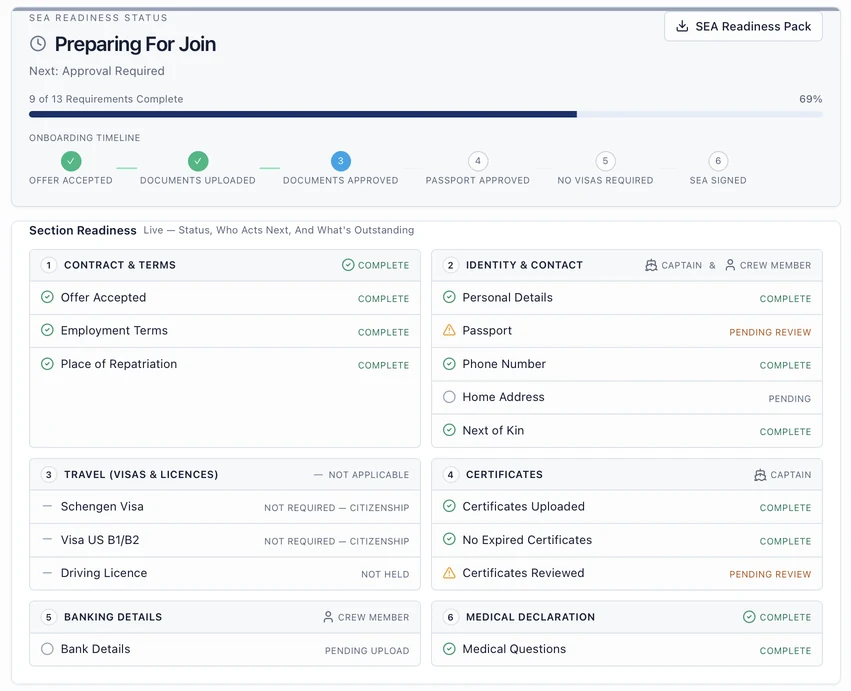
Yacht Watchkeeper SEA readiness screen showing onboarding progress and section readiness for contract, identity, travel, certificates, banking and medical declaration.

One Offer. One Onboarding Workflow.

Start with four details. End with a complete crew record.

Choose the contract type and enter Name, Email, Position and Salary. Once the offer is accepted, the crew member continues straight into one guided workflow for their details, documents, certificates and joining requirements. No PDFs to fill in, no Word documents, no chasing attachments across a dozen emails — the vessel reviews what comes in rather than assembling it.

  1. Vessel

    Choose the contract type and enter four details — name, email, position and salary. The offer goes out with the employment terms already set.

  2. Crew

    Accept and sign electronically, then continue straight into onboarding from the same link.

  3. Crew

    Complete every section in one guided flow, saving and finishing later if they need to.

  4. Vessel

    Review what came in. Everything lands on the crew profile, certificate register and planners at once.

Captured by the crew member, in one sitting

  • Personal details, address, next of kin and emergency contacts
  • Passport, visas, seaman's book and bank details for payroll
  • Certificates and ENG1, with numbers and expiry dates read on upload
  • Medical declaration and NDA, hand-signed on screen
  • Travel preferences, uniform sizes, allergies and dietary needs

Nothing is retyped by the office — the record, certificate register and planners update as the crew member completes each section.

Joining & Offers

Offer letters with contract terms issued, accepted and countersigned electronically.

Joiner Onboarding

Crew complete identity, travel, certificates and medical declaration before they arrive.

SEA Extraction

Seafarer Employment Agreements read into structured employment terms for review.

Crew Profiles

Documents, certificates, next of kin, banking, uniform sizes and history in one place.

Employment Terms

Salary, day rate, rotation pattern, leave entitlement, notice periods and flight allowance.

Contract Templates

Vessel contract templates assigned to joiners with effective-from dating.

Medical Declarations & NDAs

Hand-signed declarations and policies captured as signed PDF records.

End Of Contract

Notice, final leave position, outstanding items and the sign-off pack.

02

Scheduling & MLC

Build the watch schedule the way the vessel actually runs, and let the rest record follow from the work that was scheduled.

Yacht Watchkeeper Hours of Rest screen in Night mode showing crew work and rest compliance for the month.

Watch Schedules

Port, Guest On, Underway and Anchor modes with exclusion, inclusion and pairing rules.

AI-Assisted Scheduling

Draft a balanced schedule from vessel patterns, then review and publish it.

Hours Of Rest

Rest records generated from watches, guest operations and working patterns.

MLC Monitoring

MLC 2006 rest checks including rolling periods, with breaches surfaced for review.

Month Sign-Off

Crew and Master sign-off workflow with an immutable record once confirmed.

Watch Swaps

In-app swap requests with HOD and Chief Officer approval.

Working Hour Templates

Department working patterns that feed rest calculations.

Sea Service

Sea time and watchkeeping hours logged from voyages for MCA, RYA and flag submissions.

03

Rotation, Leave & Payroll

One rotation drives leave accrual, travel planning, end-of-contract figures and what reaches the payroll run.

Yacht Watchkeeper rotation planner showing work, leave and travel periods with accrued leave balances.

36-Month Rotations

Work, leave, travel, handover and notice periods on a long-range planner.

Leave Accrual

Daily accrual against contract entitlement, with per-day overrides where required.

Travel & Handover Days

Vessel rules for travel and handover applied consistently across the rotation.

Draft Rotation Planning

Try rotation patterns away from the live planner, compare them side by side, then agree a plan before the operational leave calendar changes.

Live Yacht Calendar

Work, leave, travel, events and guest periods on one calendar the whole vessel reads.

Leave Balances

Accrued, taken and projected balances with period-level change history.

End Of Contract Calculations

Final leave position and settlement summary, with optional approval flow.

Payroll Preparation

Salary, day rates, allowances and deductions assembled against contracts and rotations.

Expenses & Reimbursements

Receipt capture, approval chain and payroll instalments.

Training Allowance

Course invoices extracted and tracked against crew training entitlement.

Gratuities

Vessel gratuity records, crew allocations and payments held together.

Tax & UK SED Day Tracking

Recorded movements support personal day tracking and an estimated UK SED position — not tax advice or a filing service.

04

Crew Compliance & Certification

Know what is expiring. Know what is being done about it. Know when it should be resolved.

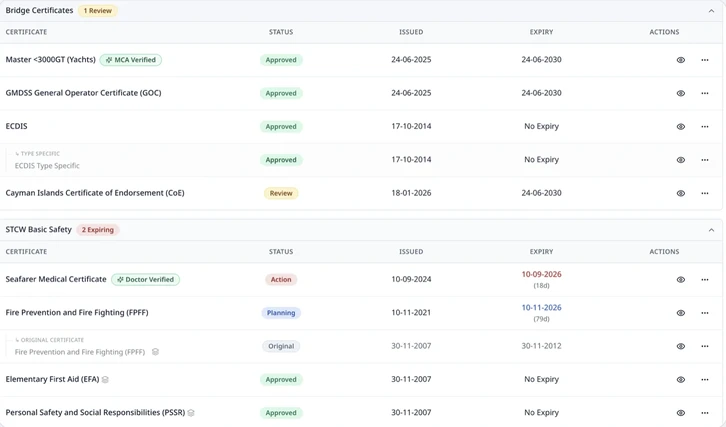
Yacht Watchkeeper crew certificate record showing required certificates by category with issue dates, expiry dates and review status.

Certificate Tracking

Certificates held per crew member with issue, expiry and refresher logic.

Document Extraction

Certificate details read from the uploaded document for review and confirmation.

Position Requirements

Required certification defined per position, with gaps made visible.

Expiry Monitoring

Approaching expiries surfaced to the crew member and the office.

Renewal Planning

An approaching expiry becomes an action with an owner and a resolution date, not just a warning.

Bulk Certificate Upload

Upload a folder of certificates: each one is identified, read, checked against the rules and filed.

CoC & ENG1 Checks

MCA Certificate of Competency checks and ENG1 approved-doctor checks applied automatically.

STCW Bundles

Bundled training expanded into its individual modules on the crew record.

Schengen 90/180

Day tracking against the 90/180 rule using recorded movements.

Visa Tracking

Visa requirements and held visas tracked against planned travel.

Crew Compliance Centre

A vessel-wide view of compliance position by crew member and department.

Documents are read with AI assistance and confirmed by a person before anything is saved. How we handle AI & your data →

05

Vessel Certification

One place for the yacht's complete certification record — built to reflect how certification actually works, not a generic document checklist.

Flag, Class and Statutory — kept separate because they are

Most systems treat certificates as one flat list. Yacht Watchkeeper doesn't, because the issuer of a certificate doesn't determine its category — an IAPP certificate issued by Lloyd's on behalf of the Cayman Islands is a Statutory requirement, not a Class one, regardless of who signed it. Getting this distinction right matters for knowing what is actually required, by whom, and under which regime.

The certificate library separates Flag, Class and Statutory requirements from the ground up, alongside Insurance & Financial Security, Corporate & Ownership, Build & Title and technical records — so the register reflects the regulatory structure your vessel actually operates under.

Smart document matching

Upload a certificate and Yacht Watchkeeper recognises what it is and matches it to the requirement it satisfies — reading the certificate's own stated regime rather than guessing from a filename or a family resemblance to another document.

Where a match is ambiguous, it is flagged for review rather than assumed. Recognition, suggestion and confirmation stay separate steps throughout, so nothing is promoted to confirmed without someone actually confirming it.

The Expected Register

Every vessel gets a live register generated from the approved certificate definitions and the vessel's own particulars — flag, tonnage, build date, trading pattern and the rest — rather than a fixed template applied to every yacht.

Each requirement carries its own applicability state: Not Relevant, Possibly Applicable, Expected, Confirmed Required, Exempt or Not Applicable. Applicability is suggested from the definitions and the particulars held; it stays a suggestion until the vessel confirms it.

Lifecycle tracking

A certificate is issued, surveyed, endorsed, renewed and sometimes replaced. Yacht Watchkeeper tracks the whole arc rather than just the next expiry date.

The register, the certificate drawer, the surveys view and the overview are designed to read from the same canonical certification record, keeping lifecycle and status aligned across the platform.

Survey status

Survey status is tracked as its own thread, separate from certificate expiry — because a certificate can be valid while a survey is still outstanding, and the two shouldn't be collapsed into one status.

Port clearance, without re-entering anything

Because certificates are already matched against the regulation that applies to your vessel, port clearance paperwork — including IMO FAL forms — populates from records you have already built, rather than asking you to re-key the same information at the point you need it fastest.

Certificate Register

The vessel's certificates held in one register, ordered the way the regulatory suite is structured.

Smart Document Matching

Uploads recognised and matched to the requirement they satisfy, with ambiguous cases sent to review.

Expected Register

A live requirement list generated from approved definitions and the vessel's own particulars.

Applicability States

Not Relevant, Possibly Applicable, Expected, Confirmed Required, Exempt and Not Applicable — suggested, then confirmed.

Lifecycle Tracking

Issue, survey, endorsement, validity, renewal and replacement held as one canonical lifecycle.

Survey Status

Surveys, windows and endorsements tracked separately from certificate expiry.

Flag / Class / Statutory

Categories separated by regime rather than by whoever issued the document.

Insurance & Financial Security

P&I, hull, wreck removal and financial-security records kept alongside the statutory suite.

Document Versions

Certificate lifecycle and previous-version history.

Port Clearance Packs

The certificate register feeding IMO FAL form population and arrival documentation.

06

Vessel Operations

The daily operational record — who is aboard, who is working, and what came down the passerelle.

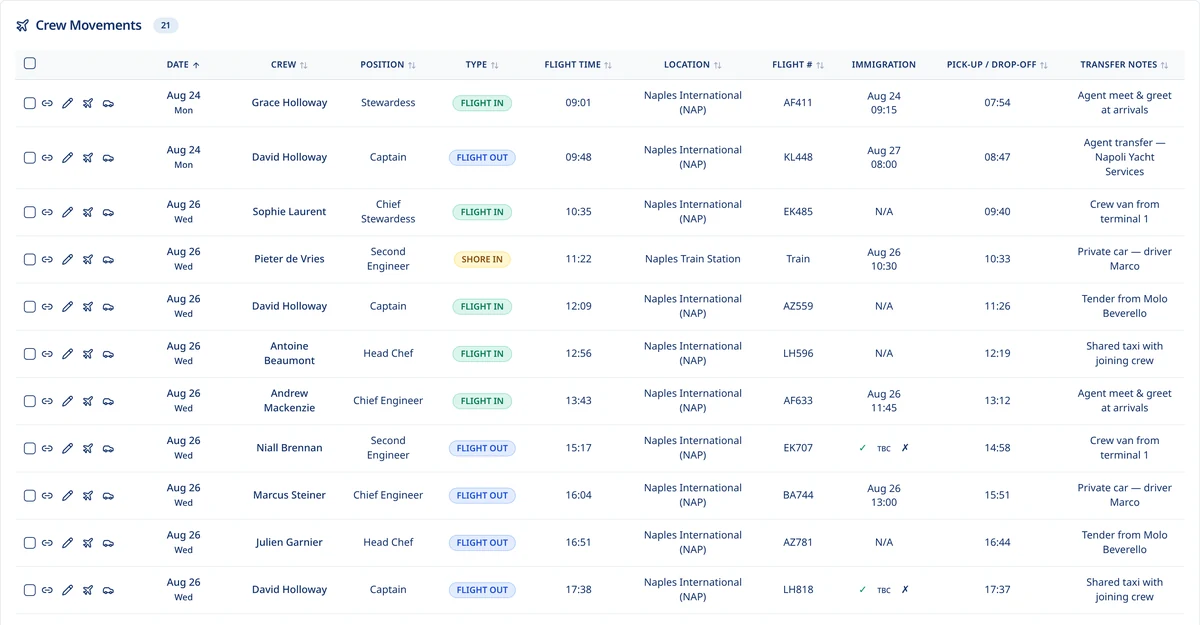
Yacht Watchkeeper crew movements schedule showing flights, immigration slots, pick-up times and transfer notes.

Sign In / Out Board

Digital gangway log with timestamps for crew, contractors and visitors.

Emergency Muster

Live muster list drawn from who is actually signed onboard.

Contractors

Contractor profiles, documents, assignments and time aboard, kept separate from crew.

Day Workers

Invite, track hours and produce dual-signature payslips.

Crew Movements

Embarkation, disembarkation and travel with airports and visa flags.

Delivery Records

Signed proof of delivery against stores and provisioning.

Package Tracking

Package references, status records and receipt tracking in one place; full automatic carrier integration is not yet available.

Cars & Transport

Vehicle records and vessel transport arrangements.

Voyage & Mileage Records

Voyage log feeding sea service and last-ports-of-call reporting.

Party Mode

A live tally of guests on and off the vessel during a function, so the number onboard is always known.

Crew Birthdays

Upcoming birthdays with onboard status, present and card planning, and collections — visible on the daily briefing and calendar.

07

Guests, Travel & Port Clearance

Guest trips, crew travel and port paperwork drawing on the same vessel data instead of a separate spreadsheet.

Port Clearance Pack — IMO FAL

Next Port Of Call

Palma De Mallorca · ESPMI

Pre-filled
  • FAL 3 — Ship's Stores Declaration

  • FAL 4 — Crew's Effects Declaration

  • FAL 5 — Crew List

  • FAL 6 — Passenger List

  • Last 10 Ports Of Call

Passport, visa and Schengen data flow from the crew and guest records already held on the vessel.

Crew travel packs

Three clicks. The whole Travel Pack, sent.

Sending a crew member to the yacht normally means a spreadsheet, three folders, a travel letter someone edits by hand, and an email written from scratch. Here it is one screen: pick the crew member and the movement, check what is included, and send. The letter, the crew list, the itinerary and the certificate of employment are built from live vessel data and go out together, addressed to the crew member and copied to whoever needs it.

  1. Click one

    Open the crew member's travel movement — flights, dates, ports and yacht agent already recorded.

  2. Click two

    Review the pack: every document is pre-filled and pre-named, with transfers and notes carried through.

  3. Click three

    Send. The crew member receives it, the office is copied, and the send is logged against the movement.

  4. After

    Change a flight or the vessel's position and regenerate — no re-editing, no stale letters in circulation.

What goes out in one send

  • Crew travel email — written for you, with the joining details in plain language
  • Travel letter on vessel letterhead, with the ship's stamp and Master's signature
  • Crew list showing the crew member's position and status aboard
  • Flight itinerary with airports, times, immigration slot and transfer arrangements
  • Certificate of Registry supporting the vessel's identity for immigration and border control
  • Yacht agent and port contact details for the arrival port

No spreadsheets, no folder hunting, no attachments dragged into an email, no travel letter edited by hand. The pack and its templates are the vessel's own, so every crew member gets the same document set, correctly dated, every time.

Guest Profiles

Guest records with preferences, dietary requirements and passport details.

Cabin Planning

Cabin assignment across guest trips with conflict checking.

Luggage & Arrivals

Arrival logistics recorded against the trip.

Flights & Transfers

Crew flights, structured airport transfers and yacht agent arrangements.

Live Flight Tracking

Provider-reported flight status, estimates and disruption notifications where vessel tracking is enabled and the service is available.

Expected Next Travel

Upcoming crew journeys and movements alongside linked rotation dates, with booked travel kept distinct from planning.

Crew Travel Packs

Travel email, travel letter, crew list, flight itinerary and certificate of employment sent together in three clicks.

Travel Letters

Vessel letterhead, ship's stamp, Master's signature and the vessel's current position, generated not typed.

Yacht Agents

Agent directory resolved by port and date, pulled into travel letters and packs automatically.

IMO FAL Forms

FAL 1, 3, 4, 5 and 6 pre-filled from live crew and guest data.

Maritime Declaration Of Health

MDH prepared alongside the rest of the clearance pack.

Clearance Packs

Port arrival documentation assembled per port of call from records the yacht already holds.

Export Documents Centre

Crew and guest lists, passports, visas, discharge books, licences and declarations assembled into the clearance workflow without uploading anything again.

Chase Boat Clearance

Chase boat particulars and assigned crew held on the same vessel account, so clearance paperwork can be produced for the yacht or the chase boat without a second crew database.

Vessel Intelligence & Weather

A wider view.
A better-informed watch.

The vessel’s position, the coming weather and the passage ahead — connected to the operation aboard.

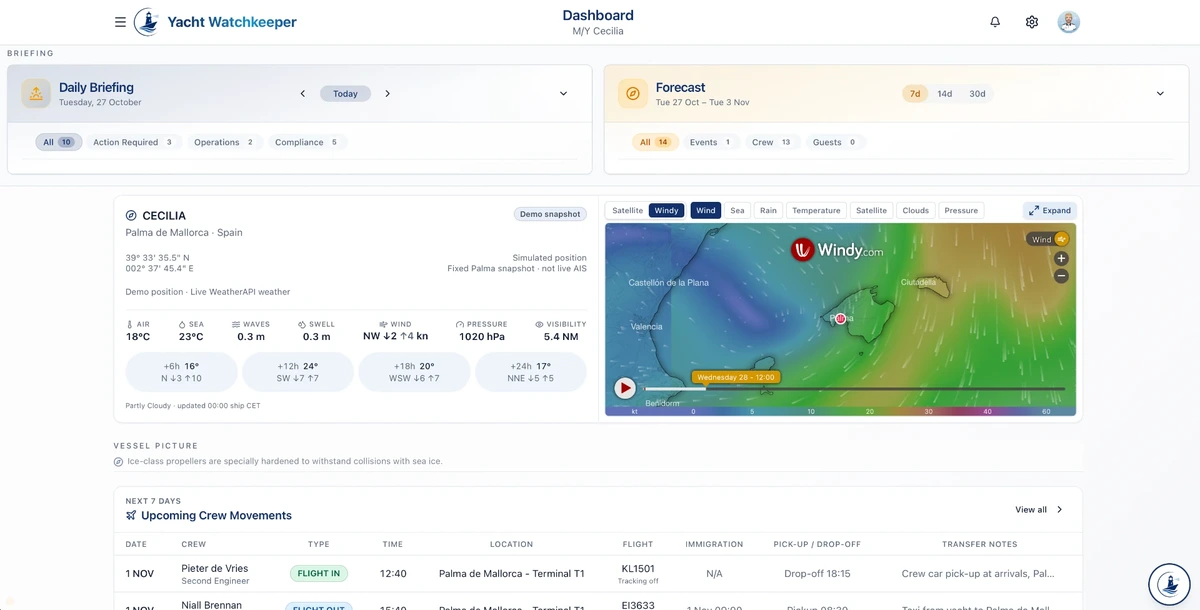
Live AIS vessel tracking on a satellite basemap sits alongside dashboard forecasts and visual Windy weather overlays. Officers can move from the daily picture to a closer look at conditions along the proposed passage.

Cecilia demo dashboard showing weather conditions, the Windy map and upcoming crew movements.
Cecilia · weather and operational overview

Prepare the passage

Import RTZ or GPX waypoints for review, enter them yourself, or begin with a generalised sea corridor. Officers confirm the waypoints used for forecast sampling.

Read the conditions

Compare forecast samples along the passage against adjustable wind, gust, wave and swell advisory thresholds, keeping forecast times and gaps in view.

Keep judgement aboard

Weather-assisted preparation informs the officer’s review. A generalised corridor is not a navigational route or clearance to sail.

AIS activation and data rights apply. Windy and passage weather are vessel-enabled, licensing-dependent capabilities; passage enhancements are introduced through a pilot. Screen refreshes do not imply a new provider forecast.

Chief Watchkeeper AI

Your yacht’s knowledge.
Part of everyday life aboard.

The manuals you upload become easier to find, easier to question and easier to put into practice.

Keep the yacht’s manuals, procedures and documents in a searchable vessel-specific library. Chief Watchkeeper draws on the documents available to your yacht, with source references that bring the answer back to the original material.

The library

Upload once. Find it again.

A ship-specific home for manuals and procedures, prepared for document search and grounded questions rather than another folder to hunt through.

The conversation

Ask. Follow the source.

Bring a crew question to Chief Watchkeeper, read a document-grounded answer and return to the cited source. The approved procedure remains the authority.

The crew

Turn knowledge into practice.

Create vessel-specific safety quizzes for crew training and drills. Host a live session or assign individual, self-paced quizzes, with multiple choice, true or false, select-all and ordering questions.

Interactive training is being introduced vessel by vessel. Yacht-specific questions and source material are reviewed before use; AI answers do not replace approved procedures or officer judgement.

Watchkeeper Stations
Genuine Cecilia demo crew movements schedule showing travel and transfer arrangements.
Cecilia · connected crew movements

Right where
the operation happens.

Shared iPads at the gangway, crew entrance and bridge put the vessel’s everyday routines within reach.

Sign-in and sign-out, watch assignments, operational checklists and signatures connect back to the vessel’s records. Management configures the workflow; the crew complete the task where it happens.

One vessel. Different routines.

Port-watch duties, readings and sign-off follow the configured checklist. Departmental Stations can be tailored around daily routines — laundry or pantry checks, for example — rather than introducing a separate spreadsheet.

Bridge and departmental workflows depend on vessel configuration and rollout; laundry and pantry are configurable examples, not released standalone modules.

Muster, even when connection is lost.

A prepared device keeps a local safety snapshot for offline muster, with roll-call records synchronised after reconnection.

Offline muster needs a locally stored roster and cached safety screen prepared while connected. The snapshot reflects its last update, not a guaranteed live headcount; other Station functions may need connectivity.

See it with your own vessel data.

Spend less time chasing admin — and more time running the yacht.

14 days completely free, no credit card required and no commitment to continue. Receive a private personalised quote during your trial.

See it by role